Context
The goal of Context is to collect information about Roboy’s environment and state. This information can be used by the dialog manager and also to react upon situations that match certain conditions, such as turning the head of Roboy when the Interlocutor moves.
Architecture
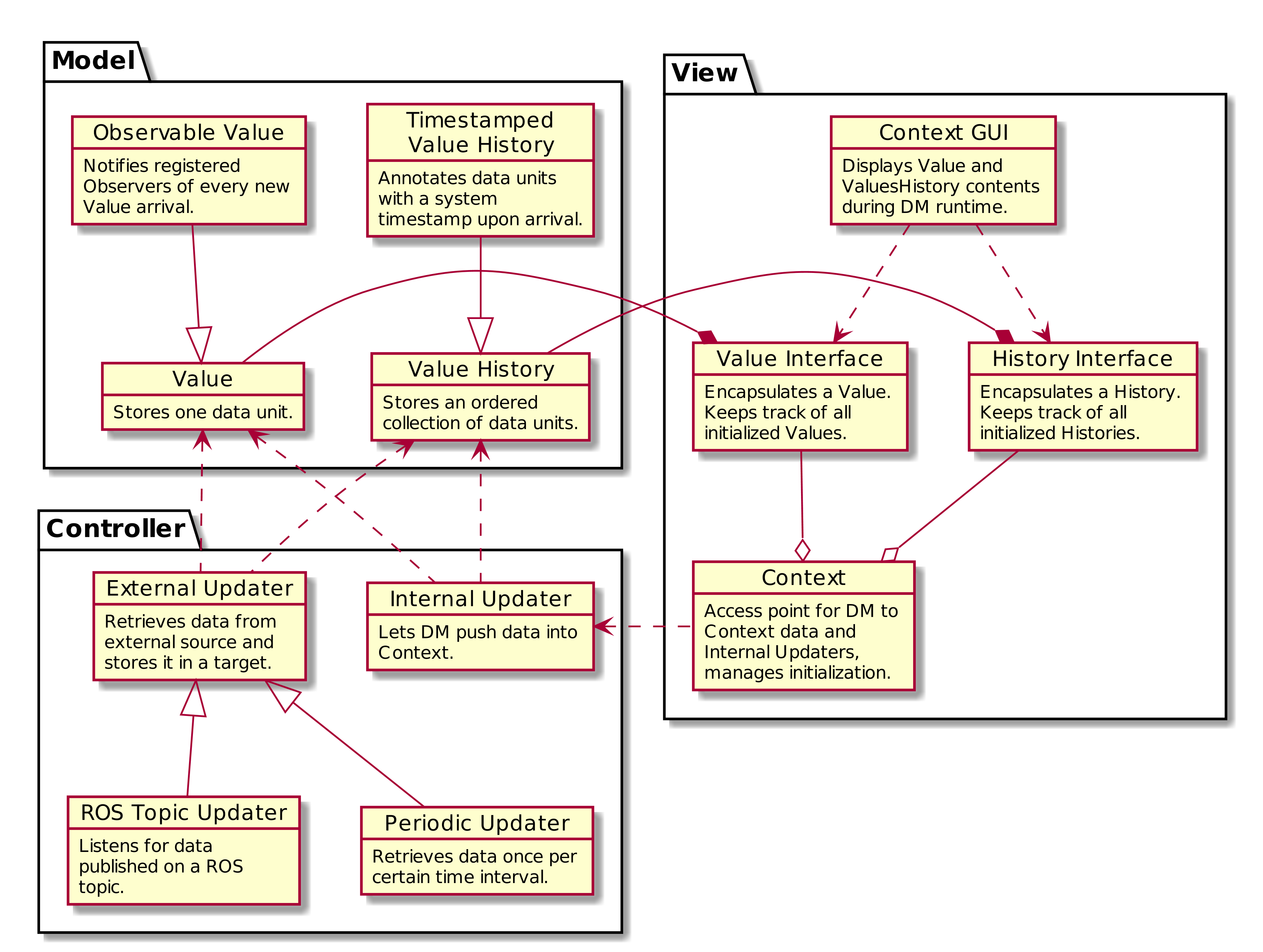
The Context supports storing data as a Value or ValueHistory. A Value only stores the latest data object that was pushed to it. A ValueHistory stores every value it receives and assigns each a unique key, thus the values can be ordered by their adding time.
How to add Values?
Here we describe how a new Value can be created and added to the Context. Sample implementations can be found inside roboy.context.contextObjects package.
- Consider what type of data will be stored in the Value. For this example, we chose
String. - In the
contextObjectsdirectory, create a new class which inherits from the Value class. The final signature should look similar to:public class SampleValue extends Value<String>(replacing String with your type). - Make the value available for the Dialog System by defining a
ValueInterfacein theContext.javaclass, among other class variables. AValueInterfacetakes two type parameters: theValueclass created in step 2, and its data type (in our case,String). Example:public final ValueInterface<SampleValue, String> SAMPLE_VALUE = new ValueInterface<>(new SampleValue()); - Congratulations, you can now query the new Value object! …but it does not receive any values yet. To change this, see “How to add Updaters?” below.
How to add ValueHistories?
ValueHistories extend the functionality of Values by storing all data objects sent to them. Over the getNLastValues(int n) method, a map with several most recent data objects can be retrieved, including their ordering. The contains(V value) method checks whether an object is currently found in the history - note that ValueHistories have size limits, therefore oldest values disappear from the history when new ones are added.
Adding a ValueHistory is very much alike to adding a Value, just make sure to:
- extend
ValueHistory<>instead ofValue<>. If the history should keep more than the default 50 values, override the getMaxLimit() method to return your desired limit value. - in
Context.java, create aHistoryInterfaceinstead ofValueInterface.
How to add Updaters?
New values can only flow into the Context over an Updater instance. Internal Updaters can be used by the dialog manager to actively add new values. External Updaters run in separate threads and query or listen for new values, for example over a ROS connection.
Updaters only add a single new data unit, relying on the AbstractValue.updateValue() method. Thanks to the inheritance chain, you can use an arbitrary Value or ValueHistory implementation as the target of an updater.
Adding an External Updater
Currently, there are two implementations of an External Updater: PeriodicUpdater and ROSTopicUpdater.
PeriodicUpdater calls an updating method after a certain time interval has passed. To use the periodic updating functionality:
- Create a class extending
PeriodicUpdaterand implement itsupdate()method. It should retrieve the values and finally add them over thetarget.updateValue(value)method call. - A constructor is required for the class. Simply match the PeriodicUpdater constructor and call
super(target)within - or use the two-parameter constructor to change the update frequency (by default 1 second).
ROSTopicUpdater subscribes itself to a ROS Topic and reacts to messages coming from the topic. To use:
- Create a class extending
ROSTopicUpdaterand define thegetTargetSubscriber()method, which will point the updater towards its target ROS topic. The options for the subscriber can be found in theRosSubscribers.javaclass. - Implement the
update()method of the new class. This method will be called whenever a new message is stored in the internalmessagevariable, so it might be enough to just calltarget.updateValue(message). If the data needs to be extracted from the message first, do it in theupdate()before callingtarget.updateValue.
All External Updaters need to be initialized in the Context.java class. To do this:
- Define the External Updater a private class variable to the
Context.javaclass (look for the external updater definition section).
- If the Updater depends on ROS, add its initialization into the
Context.initializeROS(RosMainNode ros)method, otherwise add it to the private constructorContext(). As the parameter, use the innervalueorvalueHistoryvariable from aValueInterfaceor aHistoryInterface.
Adding a new Internal Updater
- Create a class extending InternalUpdater<targetClass, valueType>. The class and data type of the target
ValueorValueHistoryare the generic parameters for the updater. - A constructor is required for the class. Simply match the InternalUpdater constructor and call
super(target)within. An example is in theDialogTopicsUpdaterclass.
- Define the Internal Updater in the
Context.javaclass. Initialize the updater within the privateContext()constructor. For example:
public final SampleUpdater SAMPLE_UPDATER; // Define as class variable
SAMPLE_UPDATER = new SampleUpdater(DIALOG_TOPICS.valueHistory); // Initialize in the constructor